The WA Cares Fund is intended for all employees, including household employees, in the state of Washington to contribute to support the access of long term care when needed.
WA Cares Fund delayed
The Fund was scheduled to start collection on January 1, 2022. However, this has now been postponed until at least April of 2022 while updates to the plan are being made.
The Legislature and Governor Inslee have announced plans to change and improve the WA Cares Fund during the 2022 legislative session, which is scheduled to conclude in March 2022. Per direction from the Governor, ESD will not collect premiums from employers until April 2022 or until further direction is received.
Is my nanny or babysitter a household employee?
A nanny or babysitter who will be paid $2,400 or more in 2022 is typically considered a household employee, for which other taxes will be required.
For more information on your household employer responsibilities, download Paycheck Nanny from theGoogle Play store for Android devicesor theApp Store for iOS devices. This will automatically calculate taxes and withholdings, track time, create & email pay statements and guide you through your tax responsibilities.
California, Colorado, District of Columbia, New Jersey, New York, Massachusetts, Oregon, Rhode Island, and Washington also have State Disability Insurance and/or Family Leave contribution requirements. See https://paychecknanny.com/blog/disability-or-family-leave-taxes/ for details.
You may have heard that President Trump issued an Executive Order allowing deferral of employee payroll tax from Sept 1, 2020 through Dec 31, 2020. What does this payroll tax deferral mean to your nanny’s paycheck?
The key point about this bill is currently it is only an optional deferral of employee portion of payroll tax (which is the 6.2% total withheld from your employee’s paycheck for Social Security and Medicare).
So as it stands, if you change your nanny’s pay so this amount is not withheld, your nanny will see a small increase in take home pay for the remainder of the year, but will then have to re-pay that increase back by April 30, 2021.
And according the IRS, you as the household employer are responsible for collecting the deferred amount back from the employee between January 1, 2021 and April 30, 2021. If you are unable to collect that amount from the employee, you as the employer would still be responsible for paying it back by or penalties will accrue starting May 1, 2021.
President Trump is hoping that further legislation occurs to make this deferral re-payment forgiven, but that has not occurred yet.
If you and your nanny do decide to stop withholding payroll tax starting September 1, you can do this via the option under Withholdings in the iOS version or Android version of the Paycheck Nanny app of whether to “Withhold FICA”. Turning this option off would enable payroll tax deferral.
It’s tax time again! If you had a nanny, babysitter, or any household employee last year, you need to file Form 5471 Schedule H with your tax return if you answer yes to any of the following.
In the 2023 tax year, did you:
pay any one household employee cash wages of $2,600?
withhold federal income tax for any household employee?
pay total cash wages of $1,000 or more in any calendar quarter to all household employees?
What this form does is capture how much you have paid to a household employee and the taxes you have already withheld. With that, it will determine the amount you owe to be included as part of your personal tax return.
If you are using the Paycheck Nanny app for iOS, your nanny’s gross earnings for Last Year on found at the top of the Pay History tab when the “Last Year” time range is selected.
If you are filing your taxes with TurboTax, H&R Block or other tax software, it will walk you through entering the information needed.
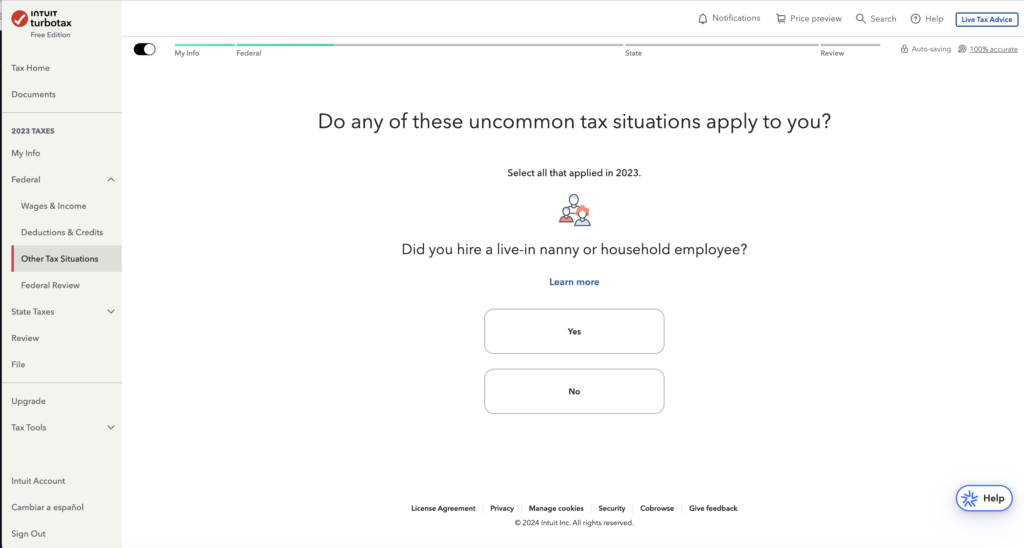
TurboTax captures this information under “Other Tax Situations” and requires TurboTax Deluxe to complete this form. If using the TurboTax free edition, it will prompt you to upgrade if you indicate that you had a household employee last year.
If you are not using tax software, you can alternatively download the Schedule H itself and also the Instructions for Schedule H from the IRS website.
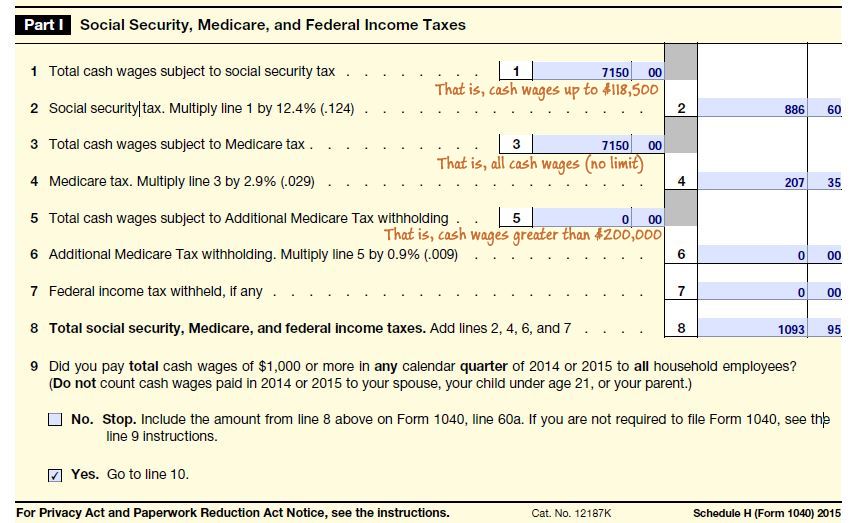
Schedule H – Part I
Below is an example of what Part 1 of Schedule H looks like when filled out, with some hints added in-line. This example is for a nanny who worked during school vacations and made $7,150 gross cash wages. While the forms below walk through an example from a prior year, Form Schedule H with your 2023 tax return will look similar, except that the limit for item 1 (Total cash wages subject to social security tax) has increased.
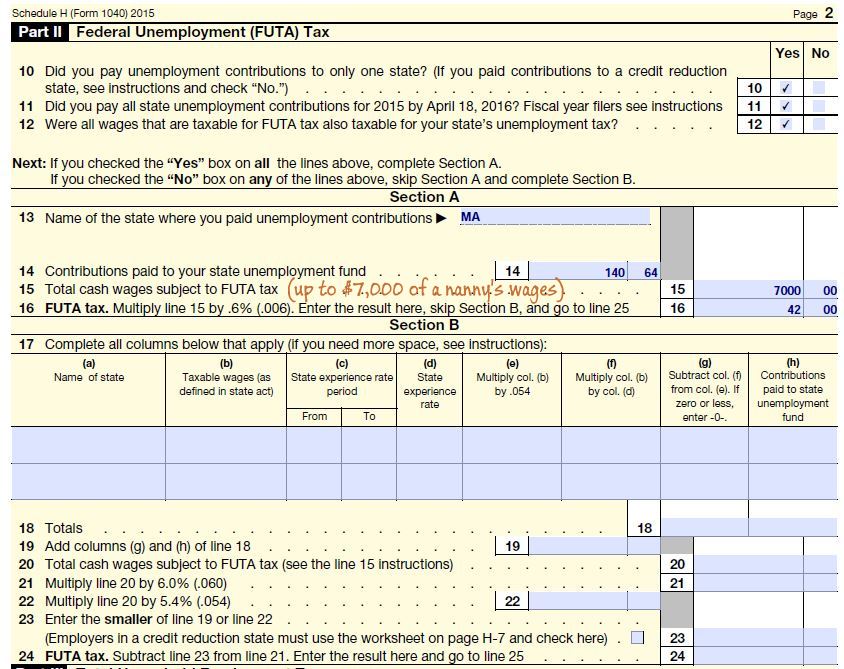
Sch H – Part II
Part II calculates Federal Unemployment (FUTA) tax owed. The calculations will vary depending on your state. For the 2023 tax year, California, New York, and the US Virgin Islands is considered a “Credit Reduction State” for Federal Unemployment (FUTA) Tax purposes. If you have employed a nanny elsewhere, skip to the section for FUTA for all other states.
FUTA for CA, NY, & US Virgin Islands
For California, New York, or US Virgin Islands, in Schedule H – Part II, leave Section A blank and fill out Section B instead.
Note the states which are ‘credit reduction states’ varies from year to year.
FUTA for all other states
For all other states, you will be paying .6% (.006) of your nanny’s first $7,000 wages in FUTA. So this means the maximum amount of FUTA you will need to pay is $42 for the year. Below is an example from Massachusetts, a non-credit reduction state. Notice if you can answer No to questions 10, 11, and 12, then you should leave all of Section B blank.
Schedule H – Part III
Than after you fill in the calculations in Part III, this Schedule H and payment owed goes along with your personal 1040/1041 tax filing as part of your yearly household employer duties.
State Unemployment Tax, also known as SUTA, is an employer paid tax that some states impose. SUTA can be in addition to FUTA (Federal Unemployment Tax) or instead of it.
The rate you pay for SUTA will be based on your state plus your history as an employer. You will be sent your rate information when you register with your state.
Alaska, New Jersey, and Pennsylvania also have a small SUI tax which is employee paid
If you are not sure where to start, or you have been shocked at the full service payroll prices, let the Paycheck Nanny App help. Find it for iOS on the App Store or get it for Android on Google Play.
When hiring a nanny and discussing salary, one often overlooked discussion is that of vacation and holiday expectations.
Vacation and holiday benefit considerations
Will you offer a certain amount of paid time off or limit unpaid time off?
Is the nanny able to choose all the dates or are there any fixed days, such as during your own vacation plans or holidays? The most commonly paid holidays are New Year’s Day, Memorial Day, Independence Day, Labor Day, Thanksgiving, and Christmas.
Will this time be lumped together to use for either sick, holiday or vacation? Or will they each be considered separately?
What sort of advanced notice do you require for time off?
Can the time be used immediately or only after some number of days worked (30 days, 60 days, etc)?
What happens to unused days? Are they rolled over into next year, forfeited, or paid out?
What is required
Federal law does not require household employers to offer paid vacation time or paid holidays for a nanny. Part-time or summer only nannies would likely not expect these perks. On the other hand, full-time year round nannies, especially experienced ones, are likely to look for or expect this benefit.
Even if a nanny does not specifically inquire about any holiday or vacation benefits, offering them can promote a positive nanny-employer relationship. This can help keep a great nanny happy and show her how much you appreciate her own well-being.
Expectation setting
No matter what you decide, you should discuss expectations up front when you discuss salary with your nanny and review yearly. In the nanny-employer relationship, upfront and frequent communication is critical in avoiding resentment and issues later on.
How to track
When using the Paycheck Nannyapp for Android devices or the app for iOS devices, vacation or holiday time to be paid should be specified via the Time Card for the corresponding pay period.
When you hire a nanny, you may be surprised at the complexity involved to simply pay her. There are several different options to handle payroll.
Payroll Option
Time Investment
Cost of service per year
Drawback
Paying under the table
Very Low
$0
Illegal, Nanny gets no benefits
Full Service Payroll provider
Low
$1,000+
High cost
Do it all yourself
High
$0
Lots of time required
Paycheck Nanny
Medium-Low
$60
Some time required
Let’s look at each of the nanny payroll alternatives in a little more detail.
Pay under the table. This is bad for the nanny and bad for you as the employer. If you are paying $2,200 or more to your nanny in 2020, it considered tax evasion to go this route. For the nanny, she loses out on accruing Social Security benefits, unemployment benefits, a verifiable record of employment to help build her credit history, and worker’s compensation benefits should she get injured on the job. Luckily, there are tax breaks available to you as a household employer which can cover much of the extra cost required to pay legally.
Use a full service payroll provider. Using a company such as Care.com HomePay by Breedlove will take care the initial registration as a household employer, handle all payroll for you, and file quarterly and yearly reports on your behalf. However, there is a steep price for this, and you may pay over $1,000 for a year of such a service.
Do all the legwork yourself. You can find out the federal, state and local requirements of what and when to register and pay for. Then on a weekly basis calculate the required withholdings, give your nanny a pay stub, retain required records, and write a check to your nanny. This is the cheapest of the legal options, but also the most time-consuming and tedious. Use this handy checklist to see what is involved.
Paycheck Nanny. Paycheck Nanny is a mobile app for Android phones and tablets or your iPhone and iPad that takes care of the most tedious and regularly recurring parts of nanny payroll, and guides you through the rest. With a $5 a month price tag and even a free trial, you can’t go wrong to give it a try. Download it from the Google Play Store or the Apple App Store.
The ‘nanny tax’ is a collection of taxes you are required by law to pay if you meet the criteria. See below to learn who each of these items apply to, and why you and your nanny should care.
Social Security and Medicare (aka FICA)
Required if you pay your nanny cash wages of $2,400 or more in 2022 (up from $2,300 in 2021). Some exceptions apply if your nanny is your spouse, your child under the age of 21, your parent, or under the age of 18; in those cases, see the Federal Household Employer Guide.
Federal Unemployment Tax (FUTA)
Required if you pay cash wages of $1,000 or more in any calendar quarter of 2022 or 2021 to your nanny. Exceptions are if your nanny is your spouse, your child under the age of 21, or your parent. Unlike Social Security and Medicare, FUTA is entirely employer paid and is not withheld from your nanny’s paycheck.
(State Dependent) State Unemployment Tax (SUTA)
Some states also impose a state unemployment insurance tax which can be in addition to FUTA or instead of it. This is state dependent and the rate can vary by individual, depending on your household employment history.
(State Dependent) Worker’s Compensation Insurance
Some states require household employers to carry Workers’ Compensation Insurance. Even if it is not required in your state, it is still recommended to protect yourself in case your nanny injures herself while on the job. This needs to be obtained from an insurance agency. Talk to one in your area for details around local requirements, cost, and how to purchase. Your homeowner’s insurance policy may provide coverage in some scenarios, so this may be a good place to start.
(Optional) Withholding Federal and State Income Tax
Withholding federal and/or state income tax is not required of household employers. But if your employee asks you to withhold it, you can.
Due to the additional overhead on the employer to handle this case, some nanny employers choose to instead advise their nanny to estimate their tax burden for the year using a tax estimator to plan accordingly.
You may be wondering why not just pay under the table? Besides being illegal, there are benefits to both employer and employee to paying legally. For the Employer, you can take advantage of tax-deferred Dependent Day Care plans offered by your employer or you may be eligible for the Child and Dependent Care Tax Credit, as well as not having to fear an IRS audit and worry about legal repercussions. For your nanny, she will be accruing Social Security, be eligible to collect unemployment, and have record of job history to build up credit.